
Slurm scheduler
Slurm manages compute resources and schedules jobs according to partition, resource requests, and cluster state. Submit production work to compute partitions; login nodes are for access, file organization, setup, compilation, and short tests.

Command reference
| Command | Purpose |
|---|---|
sinfo | Partition and node state |
squeue | Pending and running jobs |
sbatch | Submit a batch script |
srun | Launch a task or job step |
salloc | Obtain an interactive allocation |
scancel | Cancel jobs |
sacct | Job history and accounting |
seff | Job efficiency |
Use sbatch for unattended production jobs, srun for short interactive tests, and salloc for a resource allocation used by multiple commands or tools such as JupyterLab and VS Code.
Adapt example values
The original examples below use the generic partition name qcpu. Replace it with an authorized partition such as qcpu_18i or qcpu_23i after checking Partitions. Replace 作业ID with a numeric job ID and 用户名 with your username.
Nodes and partitions
sinfoNode-level information:
sinfo -NA specific partition:
sinfo --partition=qcpu| State | Meaning |
|---|---|
idle | Idle |
alloc | Fully allocated |
mix | Partially allocated |
down | Unavailable |
drain | Not accepting new jobs, for example during maintenance |
Job status
List visible jobs; add -u "$USER" to restrict the list to your own jobs:
squeueSelect a job, running jobs, or pending jobs:
squeue -j 作业IDsqueue --state=Rsqueue --state=PDR = running, PD = pending, CG = completing, CD = completed, F = failed, and CA = cancelled.
Batch submission
sbatch job.shExample script:
#!/bin/bash
#SBATCH --job-name=test_job
#SBATCH --partition=qcpu
#SBATCH --nodes=1
#SBATCH --ntasks=1
#SBATCH --cpus-per-task=4
#SBATCH --mem=8G
#SBATCH --time=02:00:00
#SBATCH --output=slurm-%j.out
#SBATCH --error=slurm-%j.err

hostname
date

# Insert your computation commands here
python run.py--job-name names the job; --partition chooses a queue; --nodes requests nodes; --ntasks requests tasks; --cpus-per-task allocates CPUs to each task; --mem requests memory per node; --time sets the wall-time limit; --output and --error select log paths.
Interactive work
Request an interactive shell (allocation can wait until resources are available):
srun --partition=qcpu --cpus-per-task=4 --mem=8G --time=01:00:00 --pty bashWhen finished:
exitFor an allocation used by several commands:
salloc -N 1 --cpus-per-task=4 --mem=8G --time=01:00:00 --partition=qcpuWait for allocation, connect to the assigned node, run your work, then leave the node and end or cancel the allocation.
Cancel jobs
scancel 作业IDThe following cancels all jobs belonging to the specified user; use carefully:
scancel -u 用户名History and resource usage
sacct -j 作业IDsacct -j 作业ID --format=jobid,jobname,reqcpus,reqmem,averss,maxrss,elapsed,state%20,exitcode --unit=Gseff 作业IDExample efficiency report:
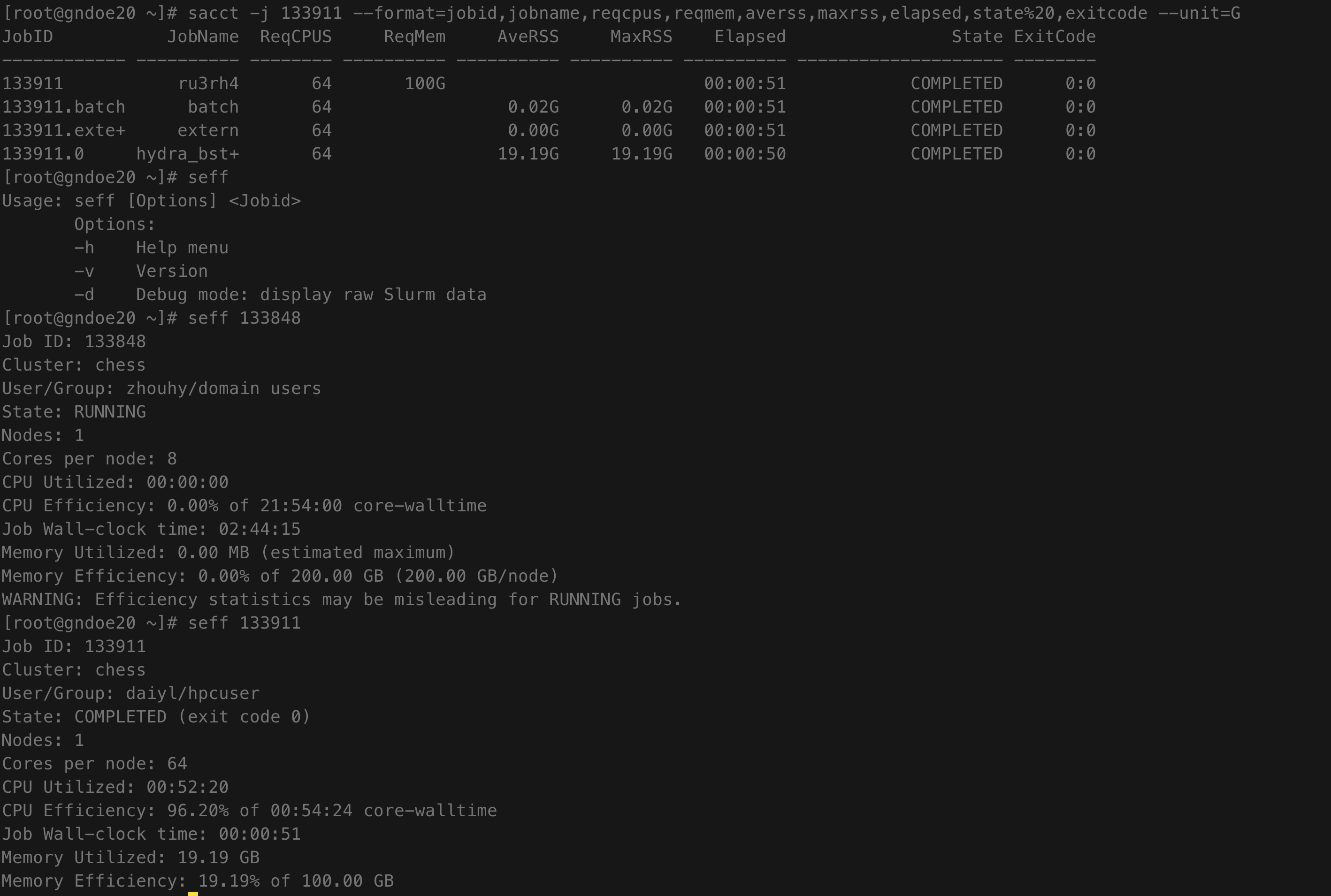
Check resource requests before submission, monitor pending/running jobs, and inspect logs and accounting afterward. Excessive requests increase waiting; insufficient resources can cause failures. See Resource limits and tmux.