Amber on the cluster
Amber (Assisted Model Building with Energy Refinement) provides molecular dynamics, energy minimization, and free-energy tools for proteins, nucleic acids, lipids, and complexes. Submit simulations through Slurm.
Login nodes are for preparation
Run minimization, equilibration, and production simulations on compute nodes. Use login nodes only for input preparation, editing, and brief environment checks.
Load the environment
module avail ambermodule purge
module load amber/22gpuCheck executables:
which tleap
which pmemd.cuda
pmemd.cuda -h | headIf amber/22gpu is unavailable, use an actual module from the listing or ask the administrator.
Copy the example
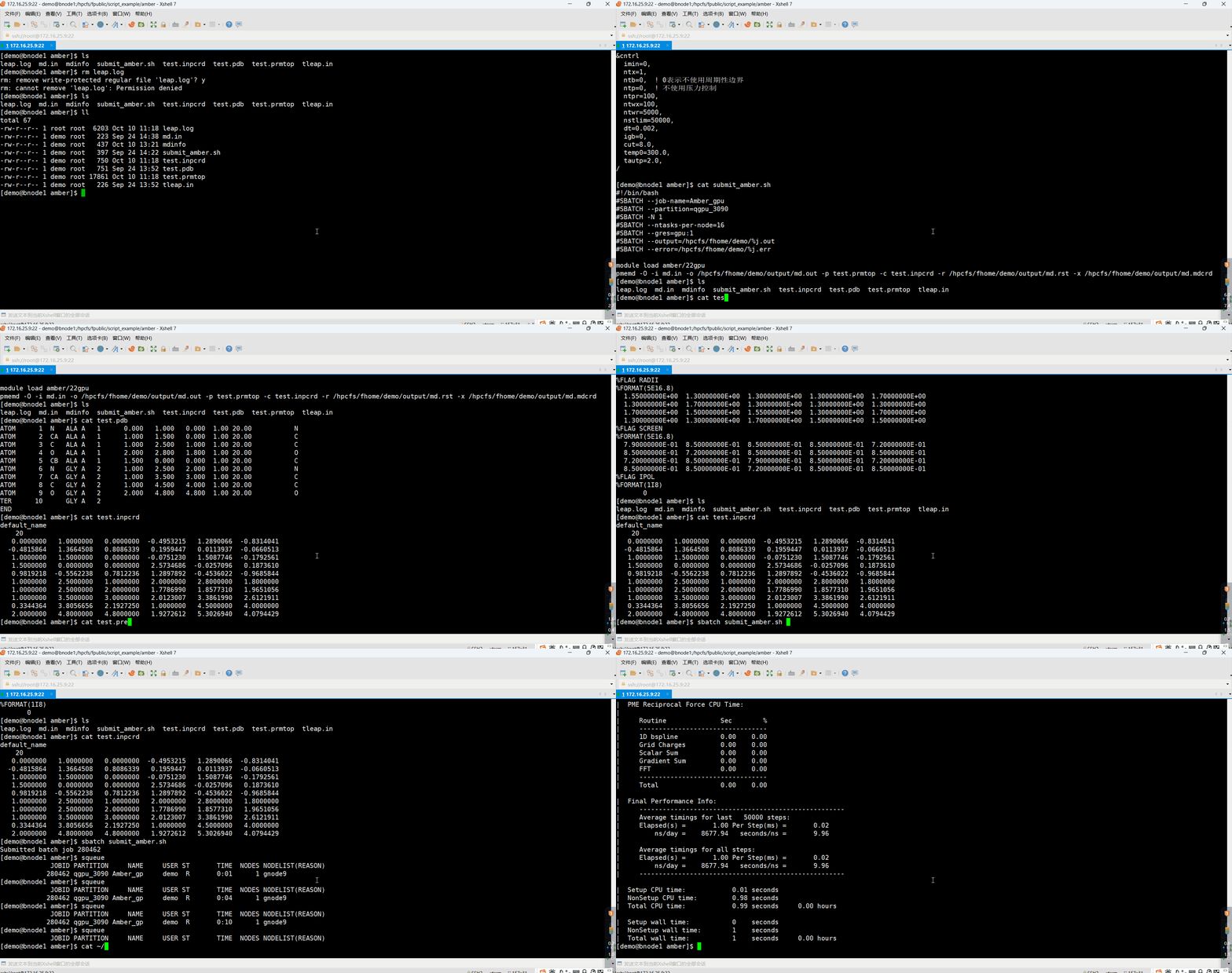
The public example is located at:
/hpcfs/fpublic/script_example/amberCopy it before making changes:
cp -r /hpcfs/fpublic/script_example/amber ~/amber-demo
cd ~/amber-demo
mkdir -p output| File | Purpose |
|---|---|
test.pdb | Initial molecular structure |
tleap.in | LEaP model and force-field settings |
test.prmtop | Topology and force-field parameters |
test.inpcrd | Initial coordinates |
md.in | Simulation controls |
Generate topology and coordinates
Example tleap.in:
source leaprc.protein.ff14SB
mol = loadpdb test.pdb
check mol
saveamberparm mol test.prmtop test.inpcrd
quitRun and inspect:
tleap -f tleap.in | tee tleap.logls -lh test.prmtop test.inpcrd
tail -n 20 tleap.logThe end of tleap.log should report Errors = 0. Resolve missing atoms, unknown residues, or missing parameters before simulation.
Demonstration input
This md.in is a short implicit-solvent test:
Short implicit-solvent MD test
&cntrl
imin=0,
irest=0,
ntx=1,
ntb=0,
igb=1,
ntt=3,
gamma_ln=2.0,
tempi=300.0,
temp0=300.0,
nstlim=50000,
dt=0.002,
cut=999.0,
ntpr=500,
ntwx=500,
ntwr=5000,
ioutfm=1,
/Not a production research protocol
A research workflow normally requires structure checks, minimization, heating, appropriate density and temperature/pressure equilibration, and production simulation. Choose stages and parameters suitable for the system, solvent model, force field, and scientific question, and assess convergence and physical plausibility.
GPU submission
Save submit_amber.slurm:
#!/bin/bash
#SBATCH --job-name=amber-md
#SBATCH --partition=qgpu_3090
#SBATCH --nodes=1
#SBATCH --ntasks=1
#SBATCH --cpus-per-task=4
#SBATCH --mem=16G
#SBATCH --gres=gpu:1
#SBATCH --time=02:00:00
#SBATCH --output=amber_%j.out
#SBATCH --error=amber_%j.err
set -euo pipefail
module purge
module load amber/22gpu
WORK_DIR="$HOME/amber-demo"
cd "$WORK_DIR"
mkdir -p output
echo "Job ID: ${SLURM_JOB_ID}"
echo "Node: $(hostname)"
echo "Started: $(date)"
nvidia-smi
pmemd.cuda -O \
-i md.in \
-o output/md.out \
-p test.prmtop \
-c test.inpcrd \
-r output/md.rst7 \
-x output/md.nc \
-inf output/mdinfo
echo "Finished: $(date)"Set WORK_DIR to your working directory, then submit:
sbatch submit_amber.slurmUse pmemd.cuda for GPU jobs. A CPU-only pmemd executable will not use an allocated GPU.
Monitor and inspect results
squeue -u "$USER"Replace 作业ID with the actual job ID:
sacct -j 作业ID --format=JobID,State,Elapsed,AllocTRES,MaxRSS,ExitCodetail -n 50 output/md.out
tail -n 50 amber_作业ID.err| Output | Contents |
|---|---|
output/md.out | Simulation, energy, and performance information |
output/md.rst7 | Final restart coordinates |
output/md.nc | NetCDF trajectory |
output/mdinfo | Runtime status summary |
CPU parallel jobs
Request a CPU partition and use pmemd.MPI when CPU parallelism is required:
srun pmemd.MPI -O \
  -i md.in \
  -o output/md.out \
  -p test.prmtop \
  -c test.inpcrd \
  -r output/md.rst7 \
  -x output/md.nc \
-inf output/mdinfoChoose CPU, memory, and partition settings based on tests with your system.
Troubleshooting
If pmemd.cuda is missing, check the loaded GPU module and executable path. For LEaP residue/parameter errors, check PDB naming, ligands, termini, and force fields; nonstandard residues often require additional parameters. For CUDA initialization failures, verify --gres=gpu:1, the assigned GPU node, nvidia-smi, and logs. If no results appear, inspect the error log, output/md.out, working directory, input files, and module version.
Demonstration