
R on the cluster
R supports statistical analysis, data processing, and visualization. Load the platform's R module after allocating compute resources.
Compute on allocated nodes
Use login nodes only for editing and brief checks. Submit sustained, batch, CPU-intensive, or memory-intensive analyses through Slurm.
Interactive R
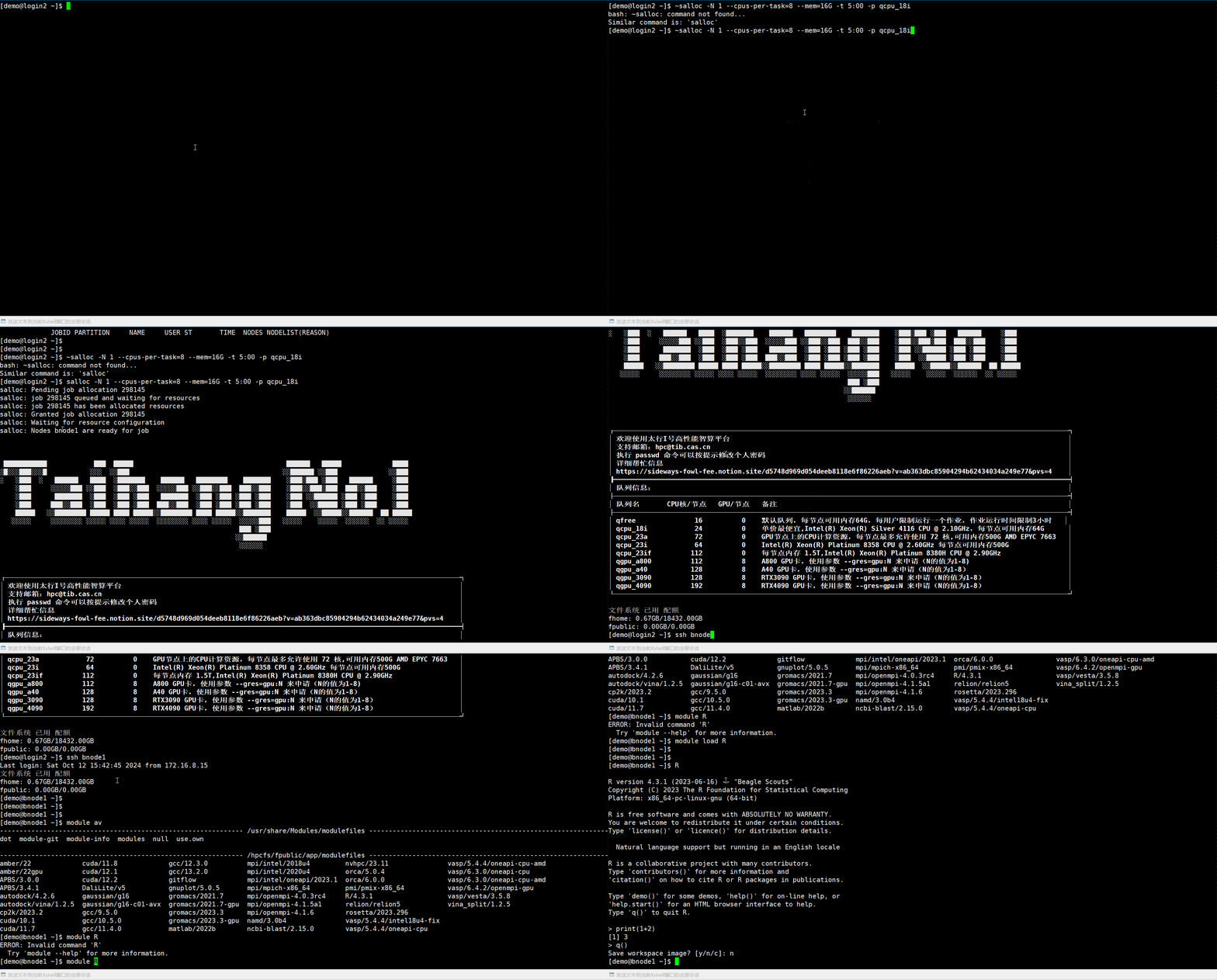
Request one node, eight CPUs, 16 GB of memory, and five minutes:
salloc -N 1 --cpus-per-task=8 --mem=16G -t 00:05:00 -p qcpu_18iExample allocation output:
salloc: Pending job allocation 273377
salloc: job 273377 queued and waiting for resources
salloc: job 273377 has been allocated resources
salloc: Granted job allocation 273377
salloc: Nodes bnode1 are ready for jobConnect to the node actually assigned to your job (the example uses bnode1):
ssh bnode1Load R and start it:
module load RRTest:
print(1 + 2)Expected output:
[1] 3Batch analysis
Save the analysis as analysis.R:
args <- commandArgs(trailingOnly = TRUE)
input_file <- args[1]
output_file <- args[2]

data <- read.csv(input_file)
summary_result <- summary(data)

sink(output_file)
print(summary_result)
sink()Save this Slurm script as run_r.slurm:
#!/bin/bash
#SBATCH --job-name=r-analysis
#SBATCH --partition=qcpu_18i
#SBATCH --nodes=1
#SBATCH --cpus-per-task=8
#SBATCH --mem=16G
#SBATCH --time=02:00:00
#SBATCH --output=%x_%j.out
#SBATCH --error=%x_%j.err

set -euo pipefail

module purge
module load R

Rscript analysis.R input.csv result.txtSubmit and monitor:
sbatch run_r.slurmsqueue -u $USERPersonal packages
Install packages into a directory you own:
dir.create("~/R/library", recursive = TRUE, showWarnings = FALSE)
.libPaths(c("~/R/library", .libPaths()))
install.packages("ggplot2", lib = "~/R/library")Add that library path in later scripts:
.libPaths(c("~/R/library", .libPaths()))
library(ggplot2)If CRAN is unreachable, ask for help configuring a mirror or upload packages for offline installation.
Demonstration
Troubleshooting
If R is missing, inspect module list, which R, and which Rscript. Package installation failures commonly involve network access, compiler dependencies, or directory permissions. Use your personal library and read the error messages. Allocating several CPUs does not automatically parallelize R: your code or packages must explicitly support parallel execution.